How to Create a Content Calendar
A calendar that survives a busy week: how to pick a rhythm you can hold, what goes in each slot, and how to fill it without a planning session every Sunday.

Quick guide
Pick a rhythm you could keep on a bad week, set up three or four recurring post types, then write in batches and schedule so the calendar runs without you.
- Pick a rhythm you could hold during your worst week. Three a week beats seven you abandon.
- Set up three or four recurring buckets so no slot is ever a blank page.
- Give each bucket a day, so the shape repeats and you stop deciding.
- Write one bucket at a time. Switching formats is where the hour goes.
- Schedule everything, then glance at the calendar view once a week for gaps.
The full walkthrough is below.
Most content calendars die the same way. Somebody builds one during an optimistic hour, assumes every week will be a good week, and by week three it's a spreadsheet nobody opens.
The ones that survive have less in them and more structure. Here's how to decide what goes in, how to fill it without a weekly planning ritual, and what Hyvo's calendar view is actually for once it's running.
What a calendar is really for
Not organisation. The real job is getting rid of decisions.
Every post you have to invent from nothing costs you four of them (topic, angle, format, timing) and decisions are what run out on a busy Tuesday. Ideas hold up fine. Decisions don't.
A working calendar answers three of those four in advance. You know the day, you roughly know what kind of post it is, and you know where it's going. That leaves one thing to think about: what to actually say.
We built the calendar view in Hyvo around that idea rather than around the list. A list is fine for "what goes out next". It's useless for "have I left a four-day hole in the middle of next week", which is the question that actually breaks a calendar.
Step 1: Pick a rhythm you can hold on a bad week
The honest question isn't "how often should I post?" It's "how often can I post in the week where two things go wrong?" Answer the second one and go with that.
Three posts a week held for six months beats daily for three weeks followed by silence. That's true for reach, true for how the algorithm reads the account, and true for the much more important reason that consistency is what makes a second visit worth somebody's time.
Step 2: Set up three or four buckets
A bucket is a recurring type of post. Its job is making sure no slot in the calendar is ever a blank page. You're not asking "what should I post on Wednesday", you're asking "what's this week's teardown".
Buckets that tend to work, whatever the business:
- Something you learned. A specific thing that happened, and what it changed.
- Something you disagree with. A common practice you think is wrong, and why.
- Something you made. Product, process, or a piece of work, shown rather than announced.
- Something you noticed. A number, a pattern, an odd detail out of your own data.
Three or four is the sweet spot. Two gets repetitive. Six is a second job.
Step 3: Give the buckets days
Assign each one a fixed slot. Monday's a learned-something post, Wednesday's a disagreement, Friday's a made-something. This is deliberately boring. The shape repeating is exactly what kills the weekly decision.
Time of day matters less than most guides suggest, at least until you've got enough history to say anything about it. Pick something reasonable, stick to it, and revisit once analytics has an opinion. best time to post reads from your own posts rather than an industry chart.
Step 4: Fill it in batches
Write one bucket at a time across several weeks, rather than a week's worth of mixed formats in one sitting. Switching between formats is where the hour goes; four "something I learned" posts in a row take a fraction of the effort of one of each.
Two ways to get first drafts down faster:
- Repurpose. A post that already performed is a bucket's worth of material. turning one idea into several posts is the method.
- Ask Hyvo AI. Chat has a Content ideas shortcut for a week of ideas that fit your brand. On Premium, Agent's Build a content plan hands back a two-week plan with the posts already drafted, based on what's actually worked on your accounts.
Step 5: Schedule it, then read it as a grid
Once things are scheduled, the Calendar view is where you check the calendar rather than the posts.
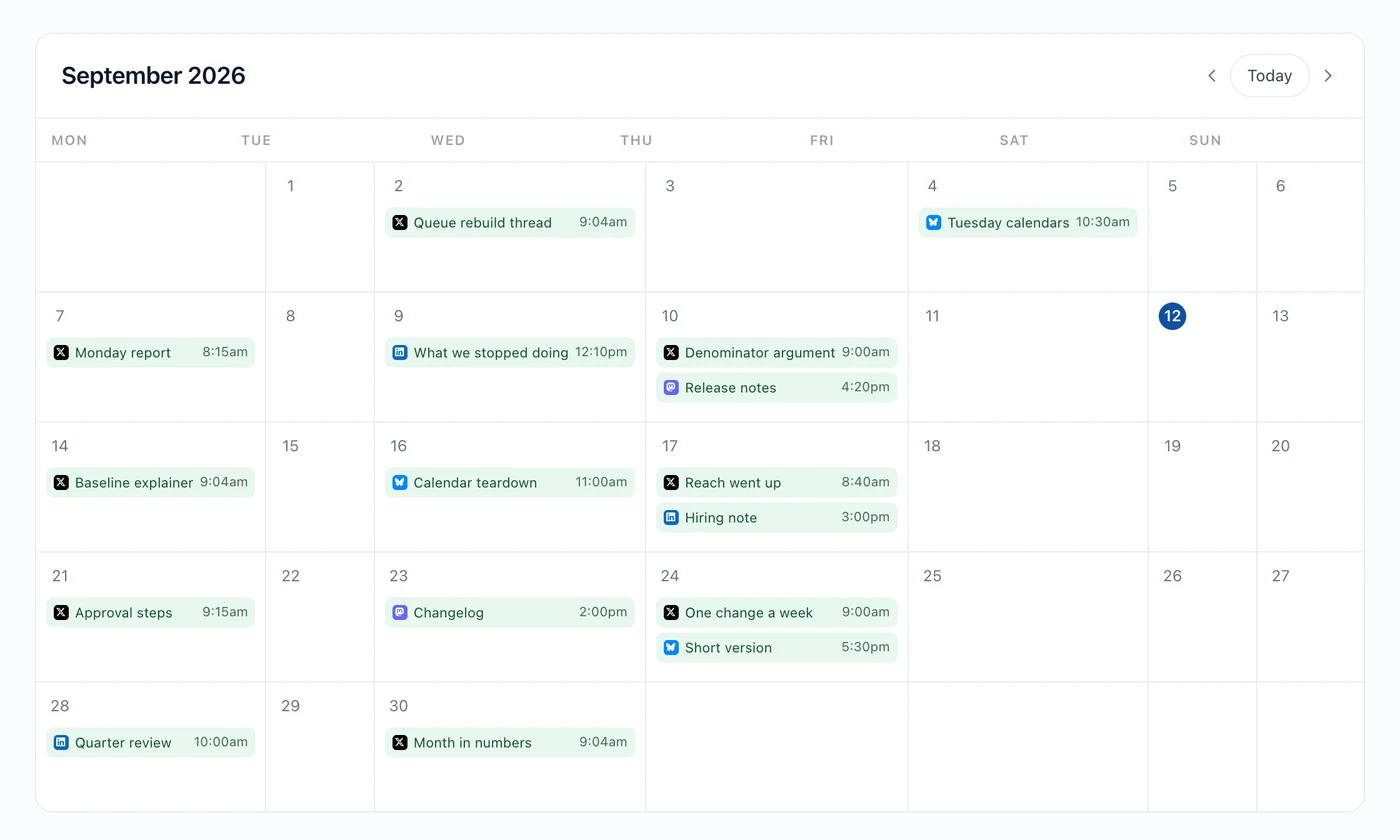
What to look for in a weekly glance:
- Gaps. Four days with nothing is invisible in a list and obvious here.
- Pile-ups. Three posts on one day usually means one should move.
- Network balance. If one icon dominates the month, that's a decision you've made without noticing.
Hyvo AI can do the same read. What's coming up and Find my gaps both answer from the real calendar rather than a guess.
What three a week looks like
| Day | Bucket | Networks |
|---|---|---|
| Monday | Something you learned | LinkedIn, X |
| Wednesday | Something you disagree with | X, Bluesky |
| Friday | Something you made | LinkedIn, Instagram |
Twelve posts a month. Call it ninety minutes of writing if you batch it, split over two sittings. Everything else is scheduled and forgotten.
Where calendars fall over
- Planning a month you'd need a good month to deliver. Build for the bad one.
- A different format in every slot. Buckets exist so slots repeat. Novelty is expensive.
- Treating the calendar as fixed. Something timely should push a scheduled post out of the way, not queue behind it. Delete or move the scheduled one. managing scheduled content covers that.
- Never reviewing it. A calendar built once and never adjusted is a guess that's stopped learning. Once a month, compare what you planned against what actually performed.
FAQs
How far ahead should I plan?
Two to four weeks is where a calendar is useful without turning into fiction. Past that, most of what you plan gets replaced by something more timely anyway.
Should every post go to every network?
No. Give each bucket its networks. A post written for LinkedIn's shape rarely reads well on X, and forcing it there is the fastest route to a flat feed.
Can Hyvo fill the calendar automatically?
Premium's automation can. A workflow on a schedule can draft posts from what performed and hold them for your approval: see how to automate content workflows.
What if I miss a slot?
Skip it. Publishing Monday's post on Wednesday next to Wednesday's post is worse than one gap.
Does the calendar show published posts too?
Yes. It draws from the same library as the Posts screen, so past and queued posts sit together.
About the author

Founder, Hyvo
Subarna Basnet is the founder of Hyvo, an AI-powered platform helping businesses create, manage, and automate social media marketing. He writes about AI, social media automation, content creation, and marketing technology.